Überblick
MAKE ist ein editoriales Theme für Shopware 6, gemacht für Mode-, Schuh- und Lifestyle-Shops. Ruhige Typografie, warme Neutraltöne und großzügige Bildflächen rücken Ihre Produkte in den Mittelpunkt. Farben, Schriften, Abstände und Texte passen Sie ohne Programmierung an Ihre Marke an.
Funktionen
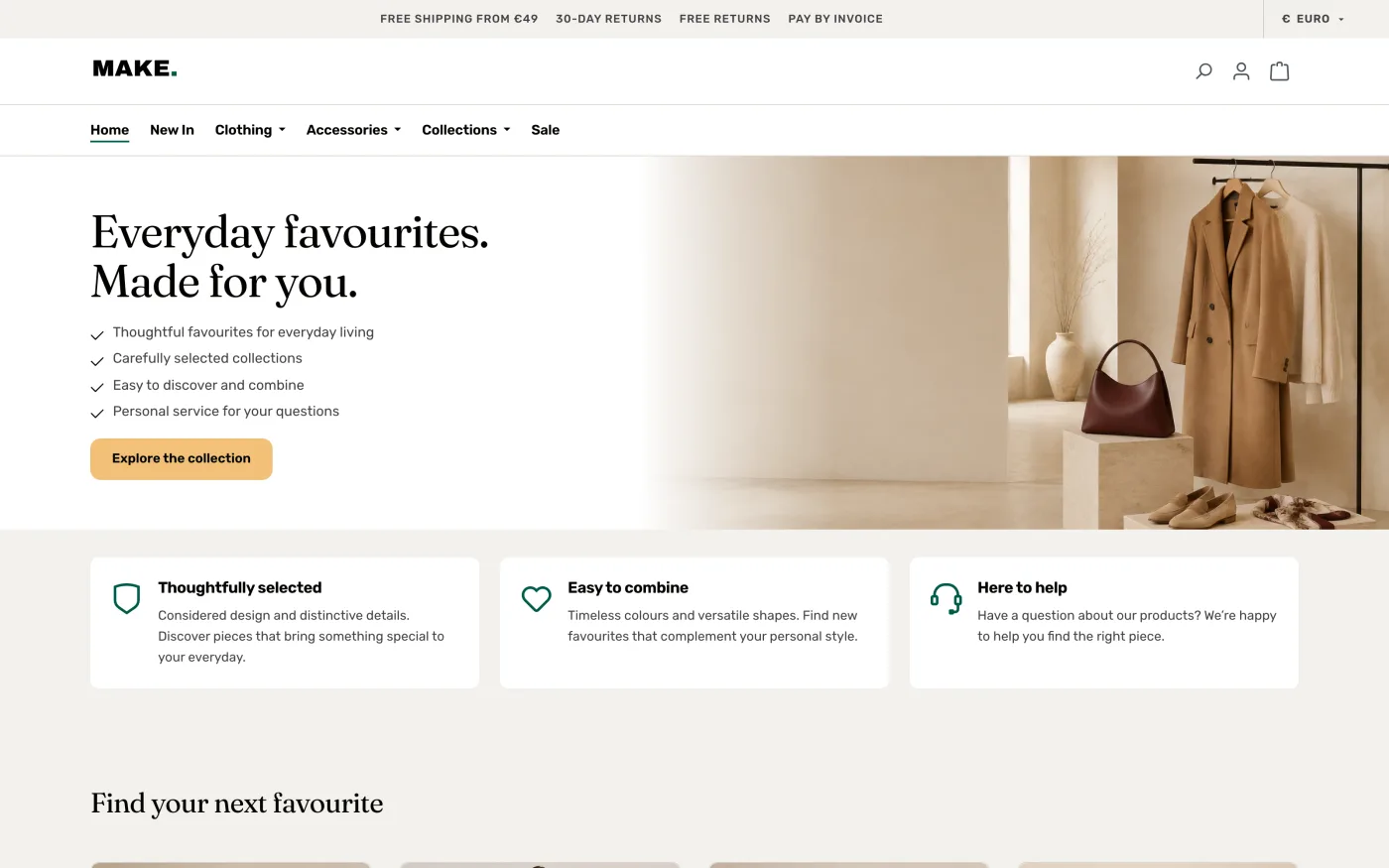
- Startseite: Hero mit Headline, Nutzenversprechen als Checkliste und Call-to-Action, Vorteils-Kacheln mit Icons, FAQ-Bereich und Newsletter mit Bild.
- Sechs eigene Erlebniswelten-Elemente: Editorial-Hero, Laufschrift, Kategorie-Kacheln, Produkt-Slider, Vorteilsleiste und Lookbook mit Produkt-Hotspots.
- Listing und Produktkarten: zweites Produktbild beim Überfahren, Merkliste, Sale-Darstellung, Bewertung, Herstellerlogo, individueller Highlight-Streifen, Kategorie-Chips und Filter als Seitenpanel.
- Produktdetailseite: großer Bild-Slider, mitlaufende Kaufbox, hervorgehobene Preisbox, Varianten als Farbfelder und Größen-Buttons, Lieferstatus, Vertrauenshinweise und optionaler Gutschein-Hinweis.
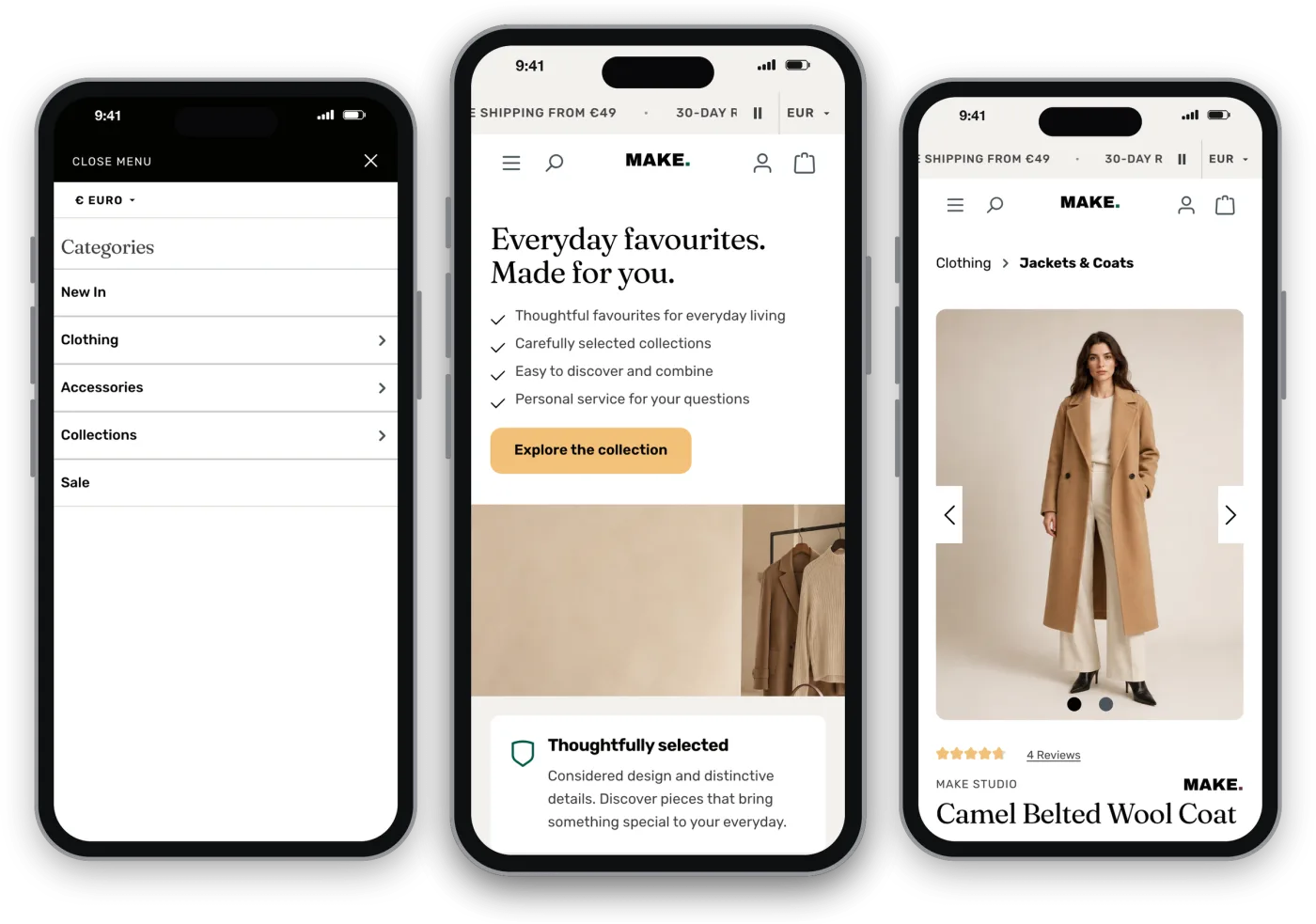
- Header und Mobile: Topbar mit pausierbarer Laufschrift, Sprach- und Währungswahl, Mega-Menü auf dem Desktop, Vollbildmenü und kompakter Header auf dem Smartphone.
- Über 150 Theme-Einstellungen mit deutschen und englischen Texten.
- Geführter Demo-Import im Backend für einen Test-Verkaufskanal.
- Technik: Schriften Fraunces und Rubik lokal im Theme, keine externen Dienste oder CDNs, Unterstützung für reduzierte Bewegung.
Overview
MAKE is an editorial theme for Shopware 6, made for fashion, footwear and lifestyle shops. Calm typography, warm neutrals and generous imagery put your products centre stage. You can adapt colours, fonts, spacing and copy to your brand without writing code.
Features
- Homepage: hero with headline, benefits as a checklist and call to action, benefit tiles with icons, FAQ section and newsletter with image.
- Six custom Shopping Experience elements: editorial hero, ticker, category tiles, product slider, benefits bar and lookbook with product hotspots.
- Listing and product cards: second image on hover, wishlist, sale display, rating, manufacturer logo, individual highlight ribbon, category chips and filters in a side panel.
- Product detail page: large image slider, sticky buy box, highlighted price box, variants as colour swatches and size buttons, stock status, trust notes and an optional coupon notice.
- Header and mobile: top bar with a pausable ticker, language and currency switch, mega menu on desktop, full-screen menu and compact header on smartphones.
- Over 150 theme settings with German and English copy.
- Guided demo import in the Administration for a test sales channel.
- Technology: Fraunces and Rubik fonts bundled locally, no external services or CDNs, support for reduced motion.
Systemanforderungen
| Komponente | Anforderung |
|---|---|
| Shopware | 6.6.x und 6.7.x, selbst gehostet, mit Storefront (getestet mit 6.6.0.0 und 6.7.14.2) |
| PHP | 8.2 oder neuer, zusätzlich gelten die Anforderungen Ihrer Shopware-Version |
| Nicht freigegeben | Shopware 6.5 und 6.8 |
| Externe Dienste | keine – Schriften und Skripte werden aus Ihrem Shop ausgeliefert |
Das Paket enthält getrennte Administrationsbuilds für Shopware 6.6 und 6.7. Das passende Storefront-JavaScript wird automatisch gewählt; ein Node-Build auf dem Server ist nicht nötig.
Requirements
| Component | Requirement |
|---|---|
| Shopware | 6.6.x and 6.7.x, self-hosted, with Storefront (tested with 6.6.0.0 and 6.7.14.2) |
| PHP | 8.2 or later, subject to your Shopware version’s own requirements |
| Not supported | Shopware 6.5 and 6.8 |
| External services | none – fonts and scripts are served from your shop |
The package includes separate administration builds for Shopware 6.6 and 6.7. The matching storefront JavaScript is selected automatically; no Node build is required on the server.
Installation und Aktualisierung
- Sichern Sie Datenbank und Dateien. Testen Sie neue Versionen zuerst in einer separaten Testinstallation.
- Öffnen Sie Erweiterungen › Meine Erweiterungen und installieren Sie MAKE aus dem Shopware Store oder laden Sie die ZIP unverändert über Erweiterung hochladen hoch.
- Installieren und aktivieren Sie MAKE Theme (technischer Name
yorgMake). - Weisen Sie das Theme unter Inhalte › Themes dem gewünschten Verkaufskanal zu, speichern Sie und lassen Sie das Theme kompilieren.
- Prüfen Sie Startseite, Kategorien, Produkte mit Varianten und Grundpreisen, Suche und Filter, Warenkorb, Konto, Checkout und Newsletter auf Desktop und Mobilgeräten in beiden Sprachen.
Alternativ per Konsole im Shopware-Verzeichnis:
bin/console plugin:refresh
bin/console plugin:install --activate yorgMake
bin/console theme:change
bin/console theme:compile
bin/console cache:clear
Installation and updates
- Back up your database and files. Test new versions in a separate test installation first.
- Open Extensions › My extensions and install MAKE from the Shopware Store, or upload the unchanged ZIP via Upload extension.
- Install and activate MAKE Theme (technical name
yorgMake). - Assign the theme to your sales channel under Content › Themes, save and let the theme compile.
- Check homepage, categories, products with variants and unit prices, search and filters, cart, account, checkout and newsletter on desktop and mobile in both languages.
Alternatively via the console in your Shopware directory:
bin/console plugin:refresh
bin/console plugin:install --activate yorgMake
bin/console theme:change
bin/console theme:compile
bin/console cache:clear
Theme-Konfiguration
Unter Inhalte › Themes › MAKE stehen 150 Einstellungen in neun Bereichen zur Verfügung. Texte besitzen deutsche und englische Felder.
| Bereich (Felder) | Einstellungen |
|---|---|
| Farben (13) | Hintergrund, Text- und Sekundärfarben, Linien, Flächen, Sale-, Erfolgs- und Markenfarbe, primäre Buttons, Topbar und Bewertungssterne |
| Typografie (3) | Display-Schrift für Headlines, Body-Schrift für Text und Oberfläche, Headlines wahlweise in Versalien |
| Layout (3) | Containerbreite, Produktbild-Format und Anzahl der Listing-Spalten auf dem Desktop |
| Header (12) | Logos für Desktop, Tablet und Mobil, Sticky-Header, Logo-Position, Vertrauens- und Beratungstext, Telefon und E-Mail |
| Produktkarten (12) | Bildwechsel beim Überfahren, Merkliste, Highlight-Streifen, „Versandkostenfrei“-Badge, Herstellerlogo, Kurzbeschreibung und Varianten-Chips |
| Startseite (53) | Startseiten-Hero mit Bild, Höhe, Titel und vier Vorteilen, drei Vorteils-Kacheln sowie vier Fragen und Antworten – jeweils mit englischen Texten |
| Topbar & Laufschrift (17) | Vorteilshinweise, Geschwindigkeit, Laufrichtung und Darstellung der Topbar, Service-Link, Sprach- und Währungsauswahl, Standards für CMS-Laufschriften |
| Produktdetail (10) | Vorteile unter dem Kaufbutton, Block „Versand & Retoure“ und Gutschein-Hinweis mit Text und Code |
| Footer & Newsletter (27) | Newsletter-Banner mit Bild, Texten und Button sowie bis zu vier Vorteile mit Icon für Footer und Produktseite |
Feste Oberflächentexte bearbeiten Sie unter Einstellungen › Textbausteine im Präfix make.*; Shopware-Systemtexte bleiben in den Shopware-Textbausteinen.
Theme configuration
Under Content › Themes › MAKE you find 150 settings in nine sections. Copy fields are available in German and English.
| Section (fields) | Settings |
|---|---|
| Colours (13) | Background, text and secondary colours, lines, surfaces, sale, success and brand colour, primary buttons, top bar and rating stars |
| Typography (3) | Display font for headlines, body font for text and interface, optional uppercase headlines |
| Layout (3) | Container width, product image format and number of listing columns on desktop |
| Header (12) | Logos for desktop, tablet and mobile, sticky header, logo position, trust and advice text, phone and email |
| Product cards (12) | Image swap on hover, wishlist, highlight ribbon, free-shipping badge, manufacturer logo, short description and variant chips |
| Homepage (53) | Homepage hero with image, height, title and four benefits, three benefit tiles and four questions and answers – each with English copy |
| Top bar & marquee (17) | Benefit notes, speed, direction and style of the top bar, service link, language and currency switch, defaults for CMS tickers |
| Product detail (10) | Benefits below the buy button, “Shipping & returns” block and coupon notice with text and code |
| Footer & newsletter (27) | Newsletter banner with image, copy and button, plus up to four benefits with icon for the footer and product page |
Fixed interface texts are edited under Settings › Snippets with the prefix make.*; Shopware system texts remain in the Shopware snippets.
Erlebniswelten-Elemente
Unter Inhalte › Erlebniswelten stehen sechs eigene MAKE-Elemente zur Verfügung. Inhalte und Medien bearbeiten Sie direkt im jeweiligen Element.
| Element | Verwendung |
|---|---|
| Editorial-Hero | Großer Einstiegsbereich mit Bild, Headline und Call-to-Action |
| Laufschrift | Durchlaufender Text-Balken, z. B. für Vorteile oder Aktionen; Standards für Geschwindigkeit und Darstellung in der Theme-Konfiguration |
| Kategorie-Kacheln | Bildkacheln mit Verlinkung auf Kategorien |
| Produkt-Slider | Horizontale Produktreihe, z. B. für Neuheiten oder Bestseller |
| Vorteilsleiste | Kompakte Reihe mit Vorteilen und Icons |
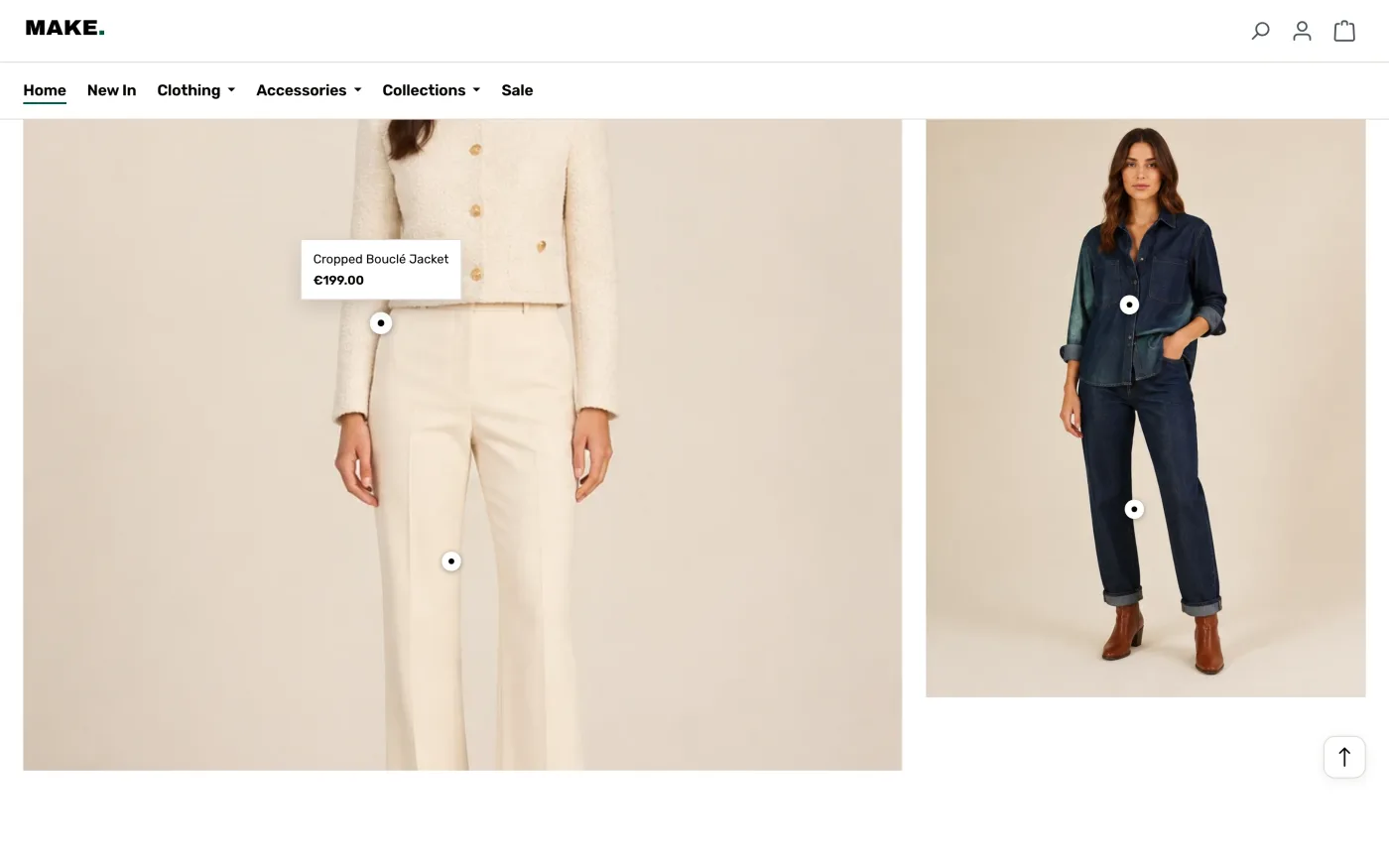
| Lookbook | Bilder mit Produkt-Hotspots; beim Überfahren erscheinen Produktname und Preis, ein Klick führt zum Produkt |
Shopping Experience elements
Under Content › Shopping Experiences you can use six custom MAKE elements. Content and media are edited directly in each element.
| Element | Use |
|---|---|
| Editorial hero | Large entry section with image, headline and call to action |
| Ticker | Scrolling text bar, e.g. for benefits or promotions; defaults for speed and style in the theme configuration |
| Category tiles | Image tiles linking to categories |
| Product slider | Horizontal product row, e.g. for new arrivals or bestsellers |
| Benefits bar | Compact row of benefits with icons |
| Lookbook | Images with product hotspots; hovering shows product name and price, a click opens the product |
Produktkarten und Produktseite
Highlight-Streifen
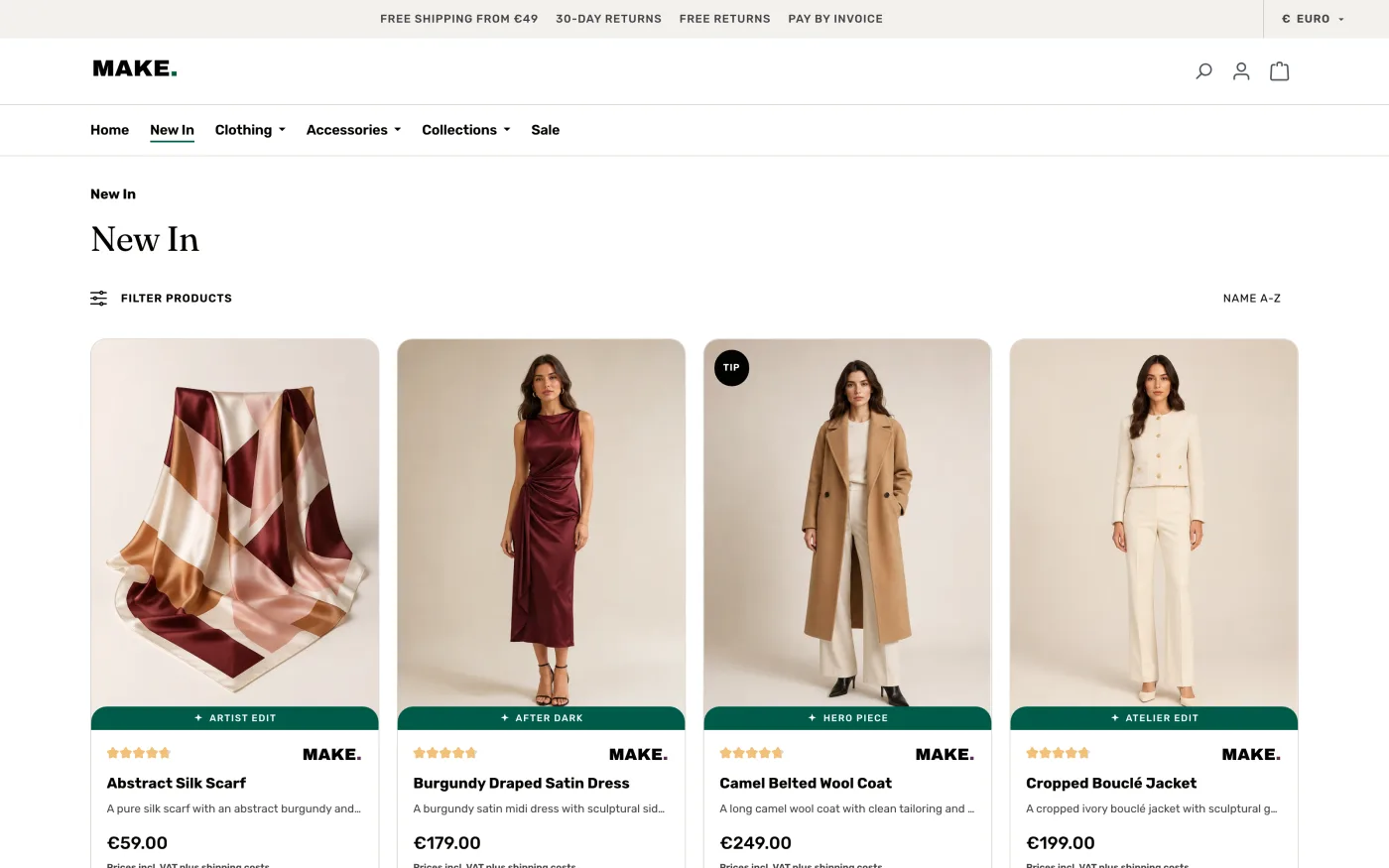
Jede Produktkarte kann einen Streifen mit kurzem Text zeigen, z. B. „Bestseller“. Unter Theme-Konfiguration › Produktkarten › Highlight-Streifen anzeigen wählen Sie:
- Bei allen Produkten (Standard): Produkte ohne eigenen Text zeigen den allgemeinen Highlight-Streifen-Text.
- Nur bei Produkten mit eigenem Text: Der Streifen erscheint nur, wenn am Produkt ein Text hinterlegt ist.
Den eigenen Text tragen Sie unter Kataloge › Produkte › Produkt › Spezifikationen › Zusatzfelder › MAKE Karte ein (Zusatzfeld make_card_highlight). Ein leeres Feld blendet den Streifen aus.
Gutschein-Hinweis
Auf der Produktseite kann ein Gutschein-Hinweis mit Text und Code erscheinen. Den Standardtext legen Sie in der Theme-Konfiguration unter Produktdetail fest; über das Zusatzfeld make_pdp_coupon steuern Sie die Anzeige je Produkt.
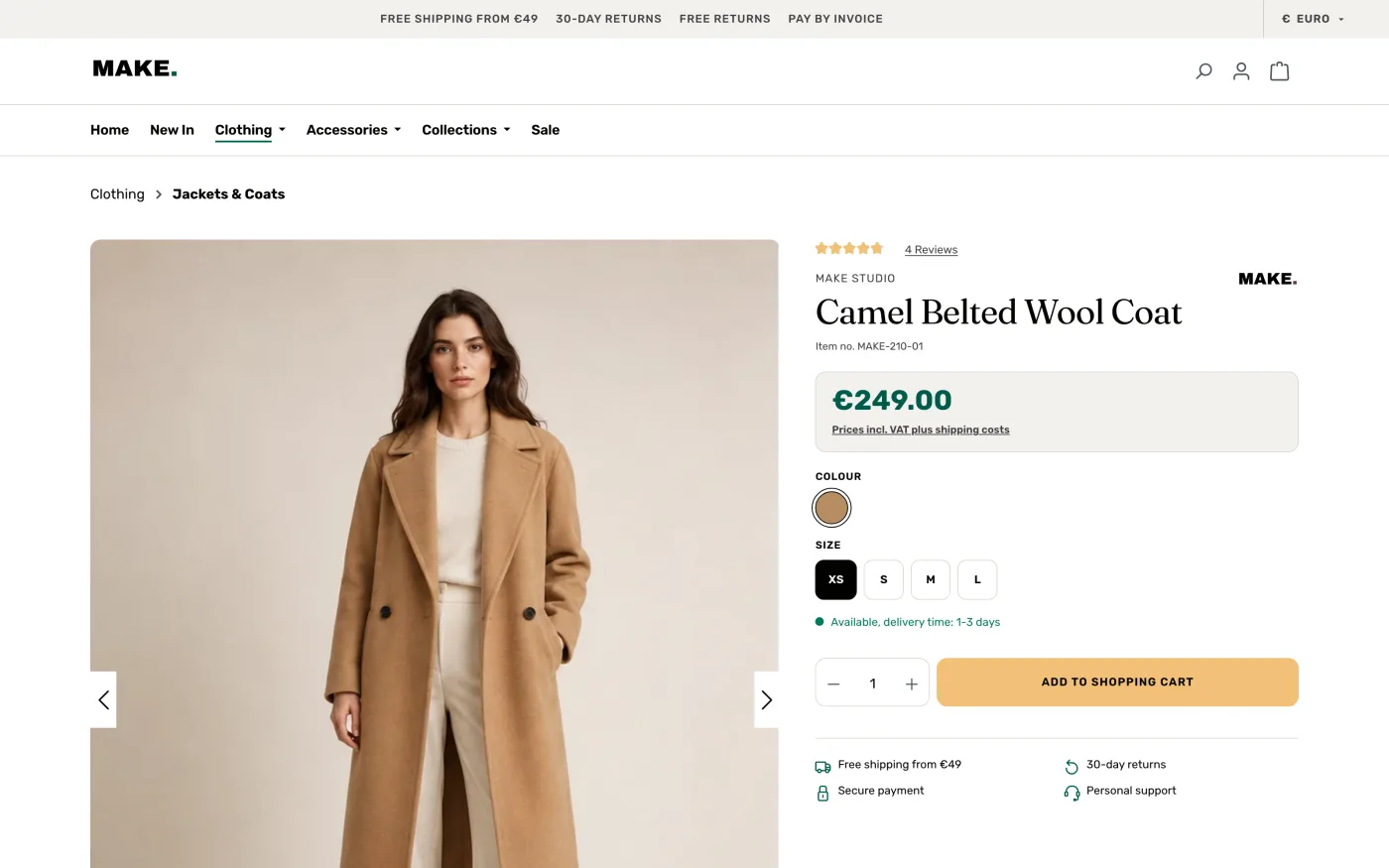
Product cards and product page
Highlight ribbon
Each product card can show a ribbon with a short text, e.g. “Bestseller”. Under Theme configuration › Product cards › Show highlight ribbon you choose:
- On all products (default): products without their own text show the general highlight ribbon text.
- Only on products with their own text: the ribbon only appears where a text is set on the product.
Enter the product text under Catalogues › Products › product › Specifications › Custom fields › MAKE card (custom field make_card_highlight). An empty field hides the ribbon.
Coupon notice
The product page can show a coupon notice with text and code. Set the default text in the theme configuration under Product detail; the custom field make_pdp_coupon controls the notice per product.
Demo-Inhalte importieren
Bei Installation und Update werden keine Produkte, Bewertungen oder Kategorien automatisch importiert. Den vollständigen Demo-Shop richten Sie bei Bedarf mit dem Demo-Importer ein.
- Sichern Sie den Shop und verwenden Sie einen separaten, nicht öffentlichen Test-Verkaufskanal.
- Öffnen Sie Einstellungen › Erweiterungen › MAKE Demo-Importer (je nach Shopware-Version heißt die Gruppe „Plugins“). Erforderlich ist die Berechtigung
system.plugin_maintain. - Wählen Sie den Ziel-Verkaufskanal. Der Snapshot vom 13.09.2026 enthält 23 Hauptprodukte, 94 Varianten, 19 Kategorien, 36 Bilder, Produktempfehlungen, die Startseite und vier Ratgeberartikel mit Übersicht.
- Optional: Startseite und Navigation zuordnen, eine separate Theme-Ableitung „MAKE Demo“ zuweisen und 80 deutlich gekennzeichnete Musterbewertungen importieren. Alle Optionen sind zunächst ausgeschaltet.
- Hinweis bestätigen und den Import starten. Ein unterbrochener Import lässt sich fortsetzen; bearbeitete Demo-Inhalte werden nicht überschrieben.
Der Import benötigt keine externe Verbindung; die Bilder sind im Paket enthalten. Echte Kunden, Bestellungen, Zugangsdaten, Rechtstexte sowie Zahlungs- und Versandeinstellungen sind nicht enthalten. Vorherige Zuordnungen von Startseite, Navigation und Theme lassen sich im Importer wiederherstellen.
bin/console make:demo:import --sales-channel=UUID --activate --theme --reviews --yes
bin/console make:demo:import --sales-channel=UUID --restore --yes
Importing demo content
Installation and updates do not import products, reviews or categories automatically. If needed, set up the complete demo shop with the demo importer.
- Back up your shop and use a separate, non-public test sales channel.
- Open Settings › Extensions › MAKE demo importer (called “Plugins” in some Shopware versions). The permission
system.plugin_maintainis required. - Select the target sales channel. The 13 September 2026 snapshot contains 23 parent products, 94 variants, 19 categories, 36 images, cross-selling, the homepage and four journal articles with an overview.
- Optional: assign homepage and navigation, a separate “MAKE Demo” child theme and 80 clearly labelled sample reviews. All options are off by default.
- Confirm the notice and start the import. Interrupted imports can be resumed; edited demo content is not overwritten.
The import needs no external connection; images are included in the package. No real customers, orders, credentials, legal pages or payment and shipping settings are included. Previous homepage, navigation and theme assignments can be restored in the importer.
bin/console make:demo:import --sales-channel=UUID --activate --theme --reviews --yes
bin/console make:demo:import --sales-channel=UUID --restore --yes
Deinstallation
Sichern Sie zuvor Ihre Daten und weisen Sie dem Verkaufskanal ein anderes aktives Theme zu.
| Variante | Was passiert |
|---|---|
| Benutzerdaten behalten | MAKE-Konfiguration, CMS-Inhalte und Zusatzfelder bleiben erhalten. Solange das Plugin inaktiv ist, können MAKE-Elemente nicht dargestellt werden; eine erneute Installation stellt sie wieder bereit. |
| Vollständig entfernen | MAKE-Elemente und eigene CMS-Blöcke, die beiden Zusatzfelder samt Produktwerten, Demo-Markierungen und Import-Fortschritt werden entfernt – auch in Entwürfen. Ohne Sicherung nicht umkehrbar. |
Native oder fremde Elemente in MAKE-Blöcken werden in einspaltige Shopware-Container überführt; MAKE-Elemente in fremden Blöcken werden durch leere Text-Platzhalter ersetzt. Produkte, Bestellungen, Kunden, Kategorien, Medien und CMS-Seiten bleiben erhalten.
Uninstalling
Back up your data first and assign another active theme to the sales channel.
| Option | What happens |
|---|---|
| Keep user data | MAKE configuration, CMS content and custom fields are kept. While the plugin is inactive, MAKE elements cannot be rendered; reinstalling restores them. |
| Remove completely | MAKE elements and its own CMS blocks, both custom fields including product values, demo markers and import progress are removed – including drafts. Not reversible without a backup. |
Native or third-party elements inside MAKE blocks are moved into single-column Shopware containers; MAKE elements inside third-party blocks are replaced by empty text placeholders. Products, orders, customers, categories, media and CMS pages are retained.
FAQ
Für welche Branchen eignet sich MAKE?
Für Mode, Schuhe, Accessoires und Lifestyle – überall dort, wo Bilder verkaufen.
Kann ich Farben und Schriften anpassen?
Ja. Logo, Farben, Schriften, Abstände und Texte stellen Sie in der Theme-Konfiguration ein.
Sind Demo-Inhalte enthalten?
Ja. Der Demo-Importer legt in einem gewählten Verkaufskanal Beispielprodukte mit Varianten und Bildern, Kategorien, eine Startseite und Ratgeberartikel an. Bestehende Inhalte werden nicht überschrieben.
Funktioniert MAKE auf Smartphones?
Ja. Alle Seiten sind für mobile Geräte ausgelegt, inklusive Vollbildmenü und Filterpanel.
Nutzt MAKE externe Dienste?
Nein. Schriften und Skripte werden aus Ihrem Shop ausgeliefert.
FAQ
Which industries is MAKE made for?
Fashion, footwear, accessories and lifestyle – wherever images sell.
Can I change colours and fonts?
Yes. Set logo, colours, fonts, spacing and copy in the theme configuration.
Is demo content included?
Yes. The demo importer creates sample products with variants and images, categories, a homepage and journal articles in a sales channel of your choice. Existing content is not overwritten.
Does MAKE work on smartphones?
Yes. Every page is built for mobile, including the full-screen menu and filter panel.
Does MAKE use external services?
No. Fonts and scripts are served from your shop.
Support
Fragen, Anpassungswünsche oder individuelle Erweiterungen? Bitte nennen Sie Shopware- und Theme-Version.
- E-Mail: info@synervia.de
- Live-Demo: make.synervia.de
- Support-Seite: synervia.de/support
Support
Questions, customisation requests or individual extensions? Please include your Shopware and theme version.
- Email: info@synervia.de
- Live demo: make.synervia.de
- Support page: synervia.de/support